

What’s Changing?
Playlab is strengthening its safety and moderation systems to give educators and administrators better visibility into student interactions. These updates focus on three areas: improved moderation accuracy, org-level notification controls, and clearer tools for reviewing flagged content. These changes are designed to help organizations feel confident that Playlab is a safe environment for students, without turning Playlab into a full incident management system. The goal is notification and attention management so admins know what needs their attention and can act on it quickly.Moderation Improvements
Playlab’s moderation system automatically detects and hides potentially inappropriate AI messages from being shown to users. The team is actively refining how moderation works to reduce disruptive false positives (messages that shouldn’t have been flagged) and improve clarity. Ongoing improvements include refining moderation categories to be more intuitive and clearly labeled, checking app prompts for usage policy violations before they turn into problematic conversations, providing additional context from surrounding messages to improve moderator understanding, the ability to provide feedback in activity view about moderated messages, and a data annotation pipeline to train more accurate and nuanced moderation models. As these improvements roll out, you may notice fewer false flags and more accurate categorization of moderated content in our new moderation digest emails.Moderation is still in active development. If you encounter a moderation decision that seems incorrect, please let us know at support@playlab.ai.
Org-Level Moderation Notifications
How Notifications Work
- Organization admins receive a moderation digest summarizing flagged activity across their org’s apps
- Notifications are batched and sent periodically rather than in real time, so your inbox stays manageable
- Messages flagged for reasons related to self-harm are always sent to org admins as urgent notifications in real time
What’s Included in a Notification
Each moderation email includes the rationale for why a message was flagged, the app name where the conversation occurred, and a deeplink to review the violative message and surrounding context in Playlab. Digest emails contain a summary of all flagged or moderated messages in the last 72 hours.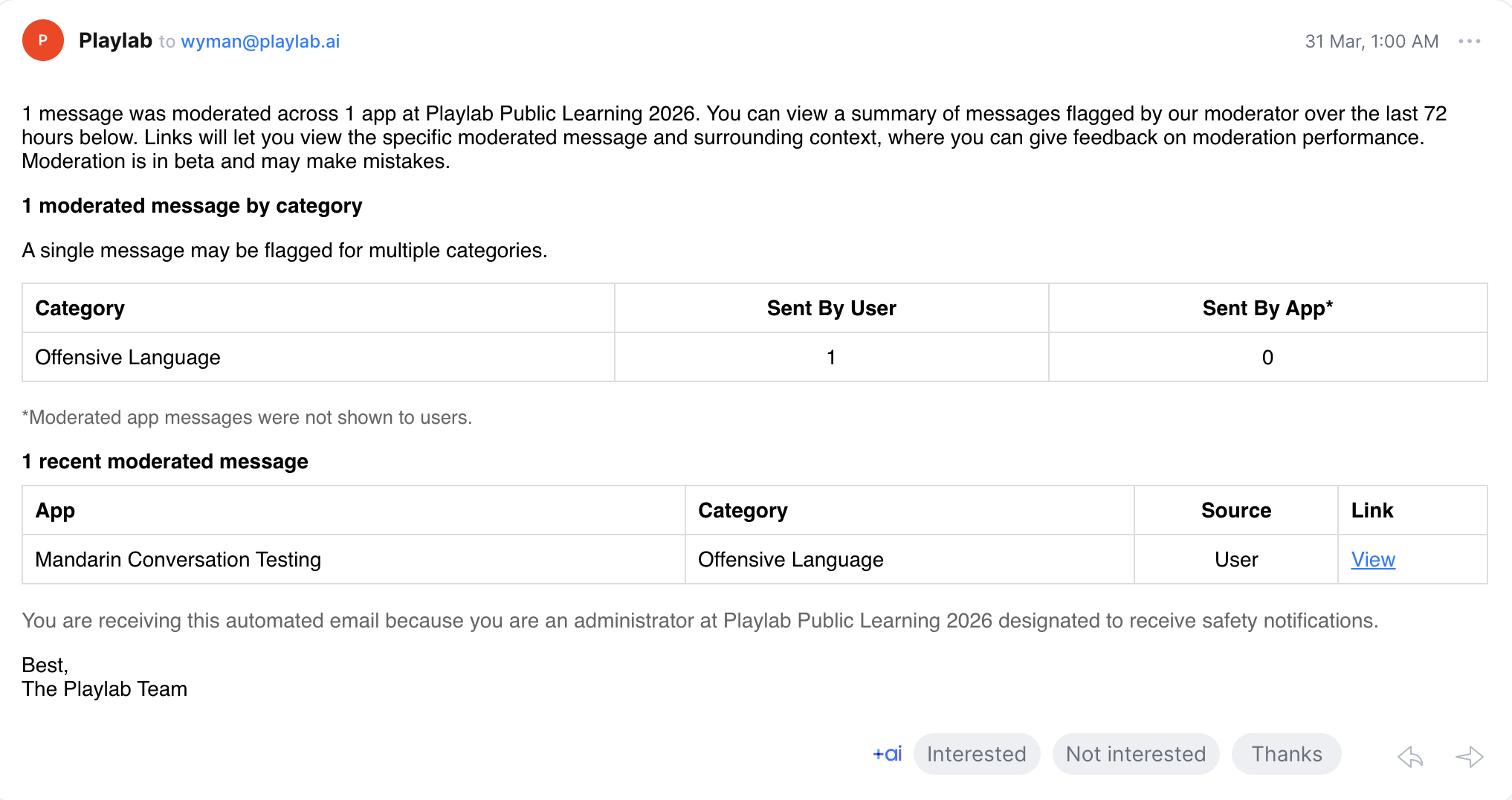
If you received a moderation email and are unsure about a category label, this is expected as the team works to refine category names. Contact your Playlab org admins or reach out to support@playlab.ai with any questions.
Safety Notification Designation
Organizations can now designate admins to receive safety notifications at the org level. Safety notifications make admins aware of moderated and flagged content across the organization, giving your team a clear point of responsibility for reviewing safety-related activity. At least one admin at your organization must be designated to receive safety notifications at all times. These notifications are designed specifically for the people in your organization responsible for student safety oversight.Flag Visibility and Acknowledgement
The safety team is building toward a system where flagged content is not only visible but actionable. Upcoming improvements include:- Flag visibility at the workspace and member level so admins can see what needs attention across their organization
- Acknowledge and mark as seen functionality that lets admins indicate they have reviewed a flag while preserving a full audit trail
- Insights views that surface patterns and trends in flagged content, starting with simple metrics and expanding over time
Frequently Asked Questions
How do I get designated to receive safety notifications?
How do I get designated to receive safety notifications?
Contact your organization’s Playlab admin or reach out to support@playlab.ai to be designated to receive safety notifications for your organization.
Can I turn off moderation notifications?
Can I turn off moderation notifications?
Moderation notifications are enabled by default for org admins and workspace owners. If you need to adjust notification settings, contact support@playlab.ai.
What moderation categories does Playlab use?
What moderation categories does Playlab use?
Playlab uses a set of moderation categories to classify flagged content. These categories are being refined for clarity and accuracy. If you see a category label that is confusing, please let us know.
What should I do when I receive a moderation email?
What should I do when I receive a moderation email?
Review the flagged conversation in your Playlab activity view. If the content was correctly flagged, consider updating your app’s instructions or guardrails or addressing the incident with the app creator and user(s) involved. If it appears to be incorrect moderation, no action is needed, but reporting it helps improve the system. You can report this in your Playlab activity view.
Does Playlab replace my school's safety protocols?
Does Playlab replace my school's safety protocols?
No. Playlab’s moderation and notification tools are designed to complement your existing safety protocols, not replace them. Playlab focuses on surfacing what needs attention so your team can follow your own established procedures.
We want your feedback! These safety features are actively evolving based on educator input. If you have ideas, questions, or feedback on how moderation and notifications are working for your organization, reach out to us.